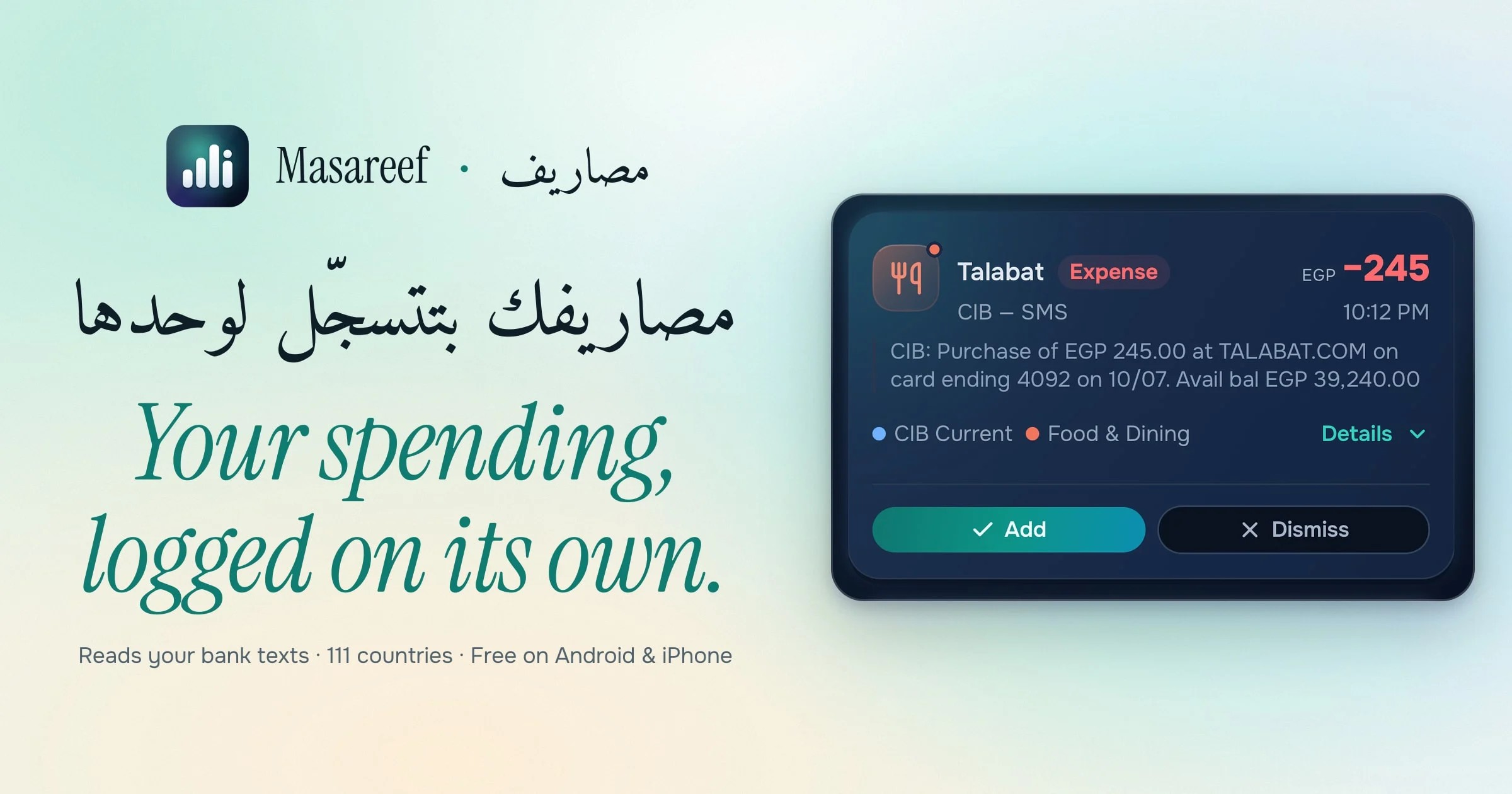
Masareef (مصاريف, "expenses") is a fast, private, offline-first personal spending tracker for any country and currency. It has wallets, budgets, insights, subscriptions and trips, and an auto-capture engine that reads your bank's notifications and logs the spending by itself, even while the app is closed. Built with Expo SDK 58, React Native 0.88, a local SQLite source of truth, and last-write-wins sync against a Cloudflare Workers API. English and full Arabic (with an Egyptian Arabic option) and a right-to-left layout, plus 37 more languages.
Masareef (مصاريف) is Egyptian Arabic for expenses. The goal is to see where your money goes without the chores most finance apps ask of you: log spending in seconds, let bank notifications fill in the rest, and keep the app out of your way.
Download#
Masareef is live on Google Play and on the App Store. It works in any country and currency, in light and dark, and fully in Arabic with a right-to-left layout.
One link that sends each phone to its own store: the install page, or تحميل مصاريف بالعربي in Arabic.
A page for each feature, in Arabic and English: تطبيق تتبع المصاريف مجانًا · تسجيل المصاريف تلقائيًا من رسائل البنك · تطبيق ميزانية شهرية مجاني · تتبع الاشتراكات الشهرية · تسجيل الديون: من لك ومن عليك · تتبع مصاريف السفر · الفواتير المتكررة · تطبيق ادخار وأهداف مالية · متابعة الأقساط والجمعيات · تقسيم المصاريف مع الأصدقاء · كل مزايا مصاريف · All features in English.
Automatic capture differs by platform, because the operating systems differ. On Android it reads your bank's payment notifications; the Play build never asks for the SMS permission, and past bank SMS can be brought in from a backup file instead. On iPhone no app can listen for another app's notifications, so capture there is bank SMS, handed over by a Shortcut you set up once, with a guided setup and a Test button for each step. On iOS 27 and later the same automation also reads Wallet and your country's bank apps (at most 30 per country, ranked by popularity), as long as the app shows the alert as a notification. Home tells you if capture goes quiet. Everything else is the same on both: wallets, budgets, insights, subscriptions, nearby ATMs and sync.
Privacy Policy · Delete your account
What it costs#
Masareef is free, and the free tier is not a trial. You keep every transaction you enter, cloud sync on one phone, all your wallets, budgets, goals and debts, and 25 automatic captures a month, for as long as you use it.
Masareef Pro is for when you would rather your spending logged itself. It adds:
- Automatic capture with no monthly cap
- Receipt photos, with the total, shop and date read off the picture on your own phone
- The insight screens: where the money actually went, the charge that is not like the others, everyone you pay ranked, and your year in one scroll
- Statements for any date range, automatic backup to your Google Drive or iCloud, a choice of where the ledger lives (our sync, your own Drive or iCloud, or this phone only), and sync across every device instead of one
- Your plan (do your goals and debts fit what is left each month, and where it leads in 5, 10 and 20 years) and the money structure that sets the reserve, savings and goals up in one approved pass, the year pack of statements, receipts and CSV in one tap, bulk edit, a password on the backup file, the larger widget set, net worth with gold and foreign cash, credit-card billing cycles, and return and warranty windows with a reminder before either closes
- Cash flow to payday and the payday routine, trips in their own currency, wallets in other currencies, a shared household ledger, Kitties (a shared pot several people pay into), splitting a bill by percent, amount or shares, round-ups, budget rollover, reminders set your way with a money calendar and a week-ahead digest, CSV export, offline voice, and app icons
- Five AI helpers (Rescue for an alert the parser refused, Coach, a coach for growing your income, a second read of a receipt, and cloud voice), each telling you what leaves the phone
| Plan | Price | Billing |
|---|---|---|
| Monthly | $4.99 | a month, cancel any time |
| Annual | $29.99 | a year, so $2.50 a month: about half of paying monthly |
| Lifetime | $79.99 | paid once, yours for good (was $99.99 until 27 October 2026) |
Prices are in US dollars. Google Play and the App Store show the price for your country, in your own currency, before you pay. There is one Pro, with no tiers, no add-ons, and nothing sold separately later.
Pro is sold inside the app, through Google Play on Android and the App Store on iPhone: open Masareef, tap Get Pro, pick a plan. The purchase follows your account, so signing in on another phone brings it with you. Refunds, support and terms are at the foot of this page.
Screens#
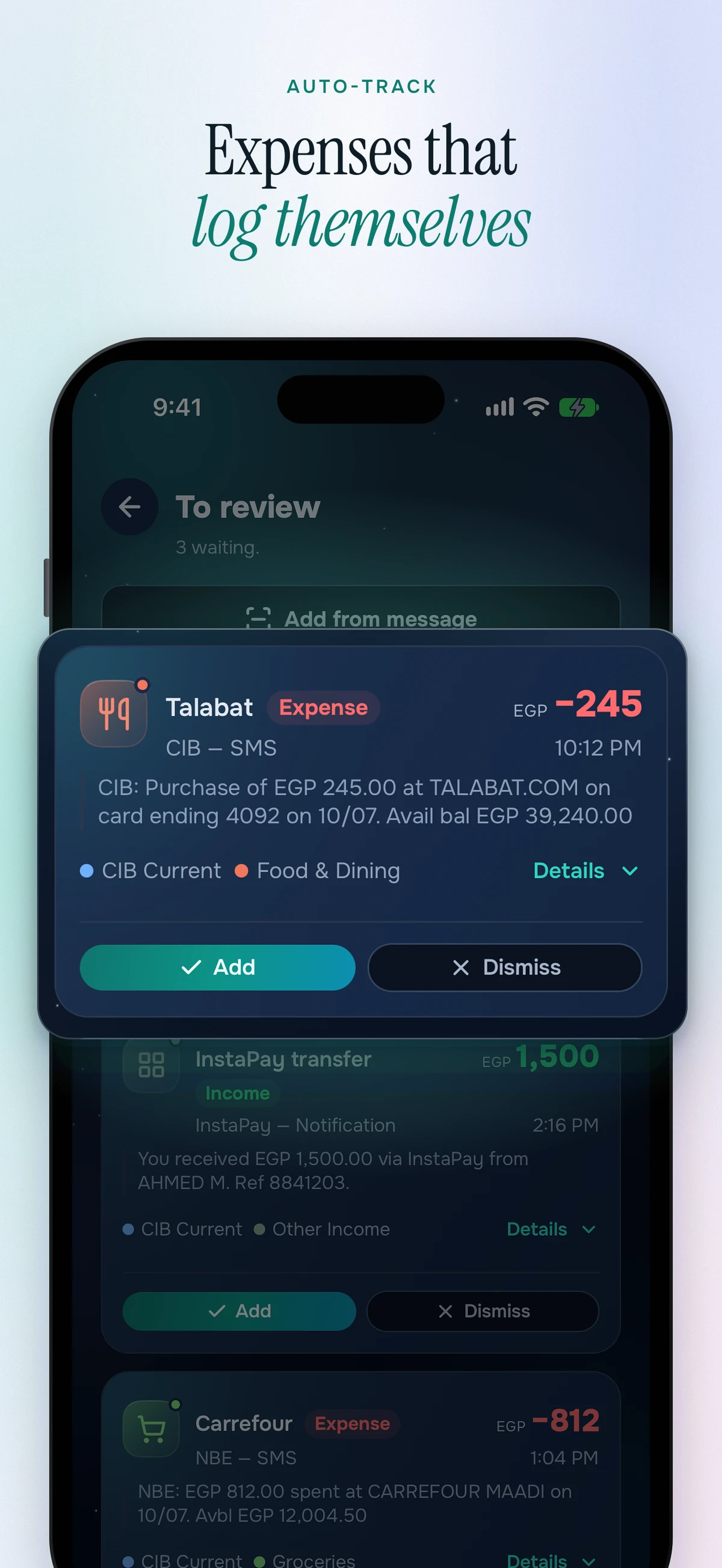
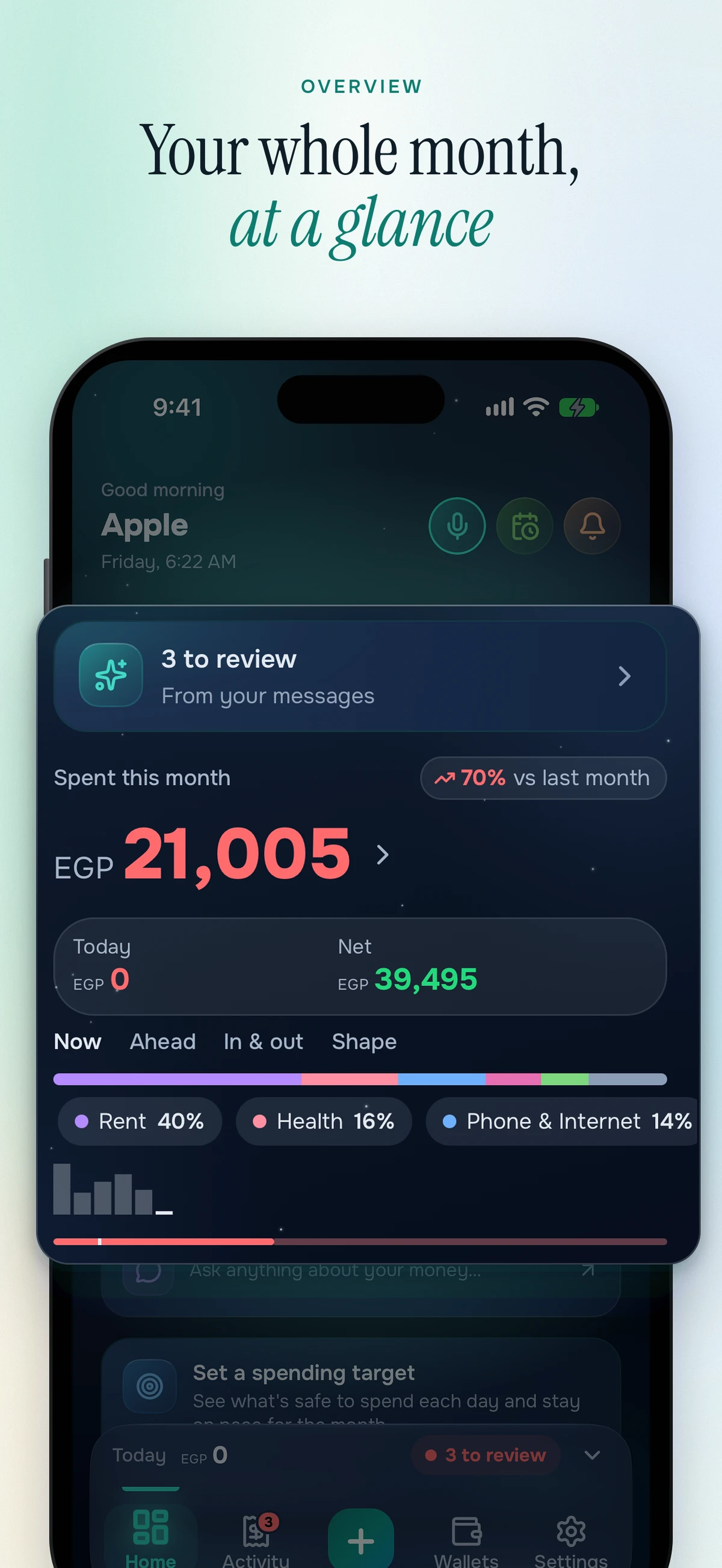
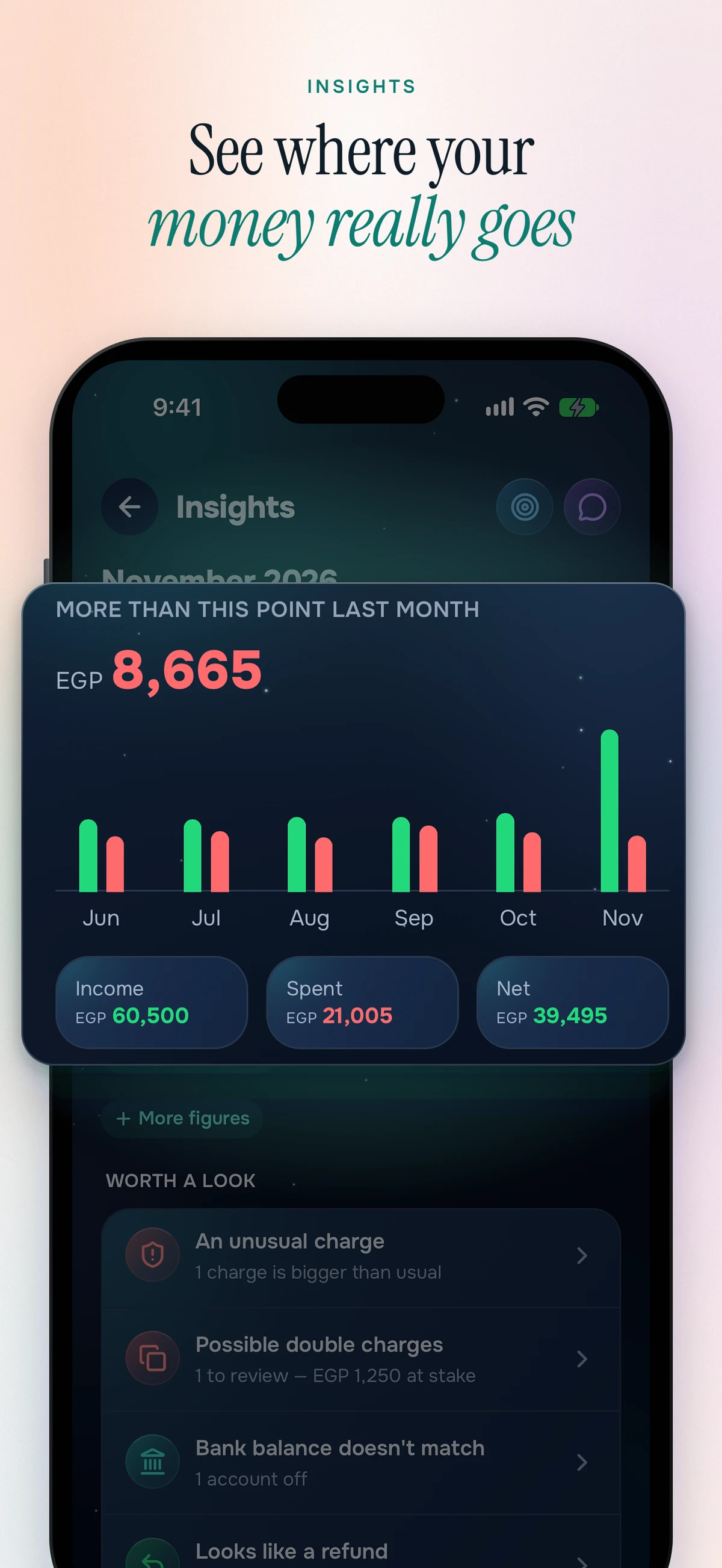
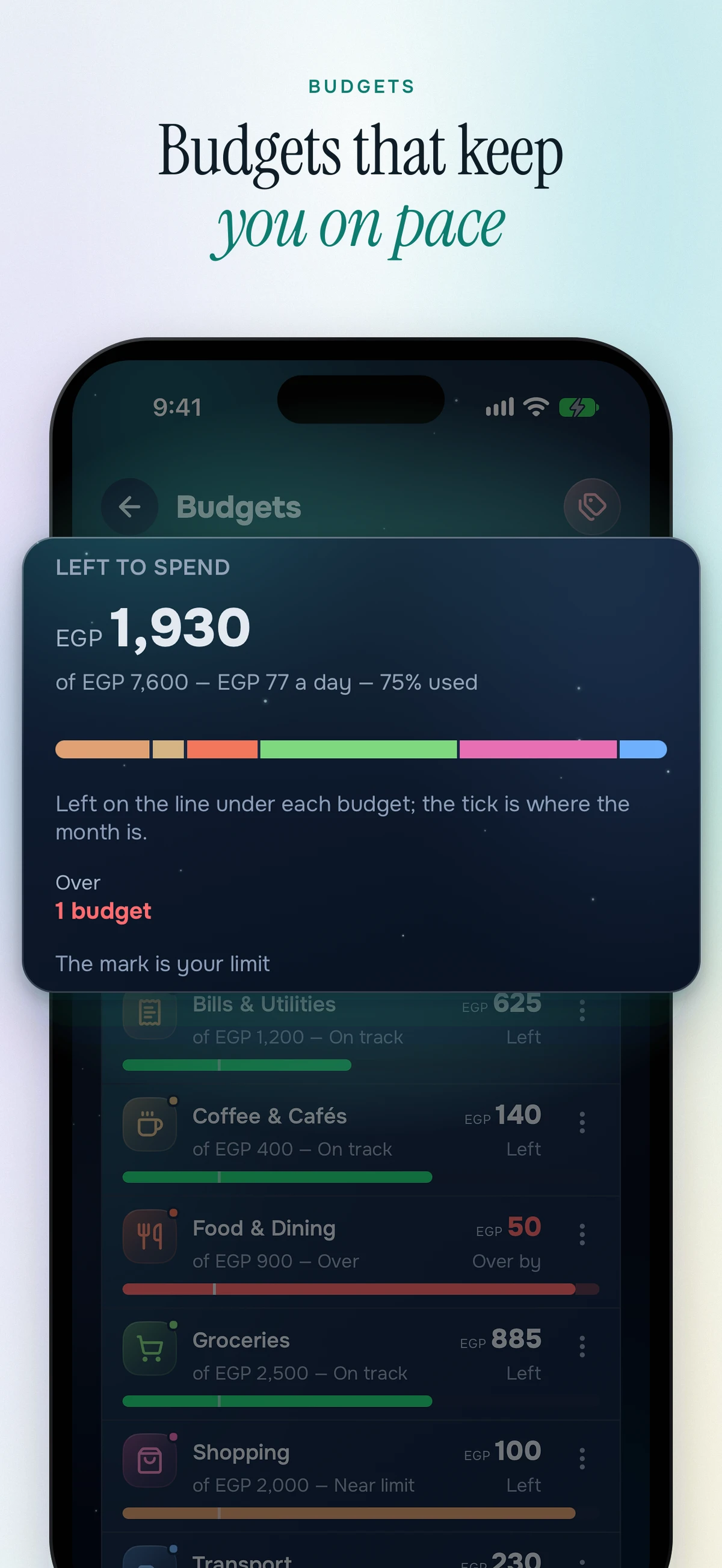
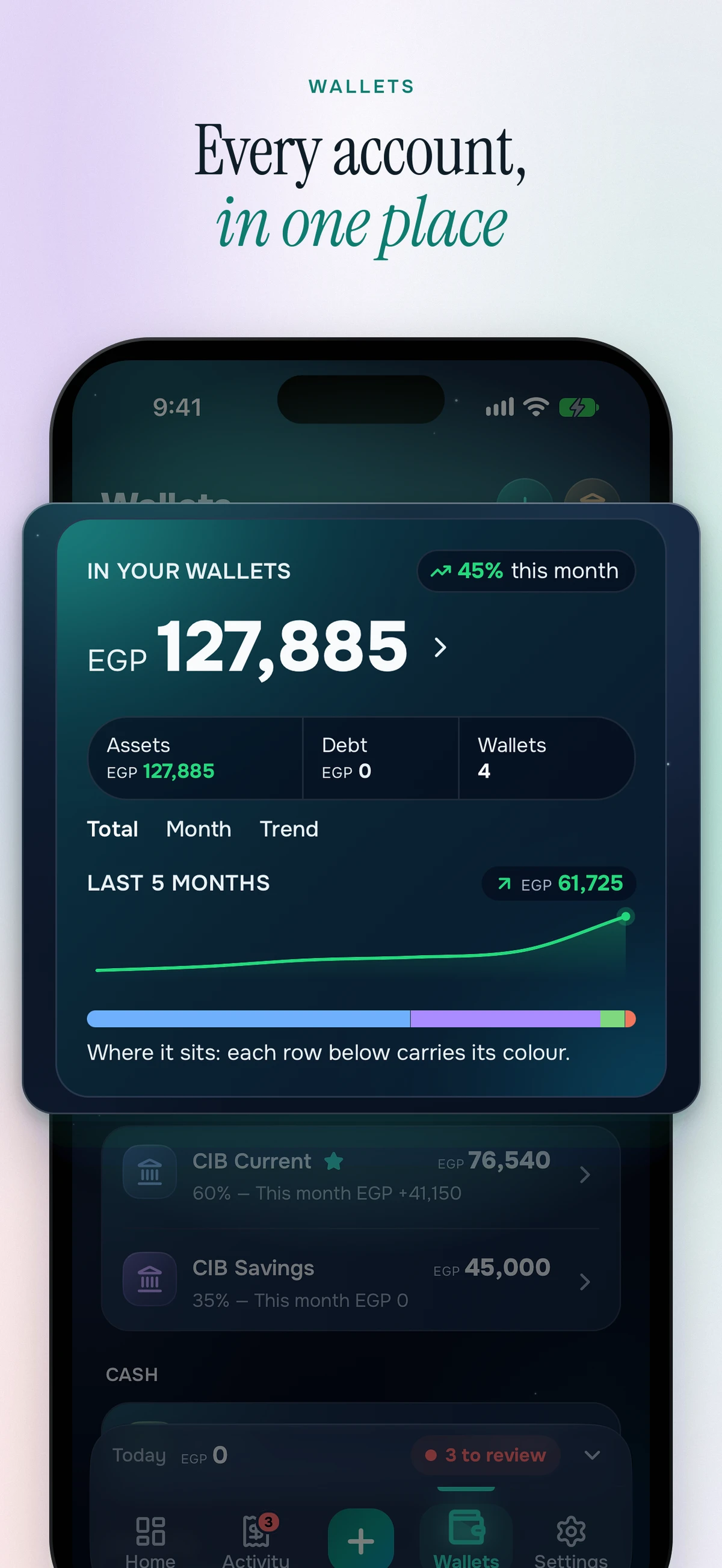
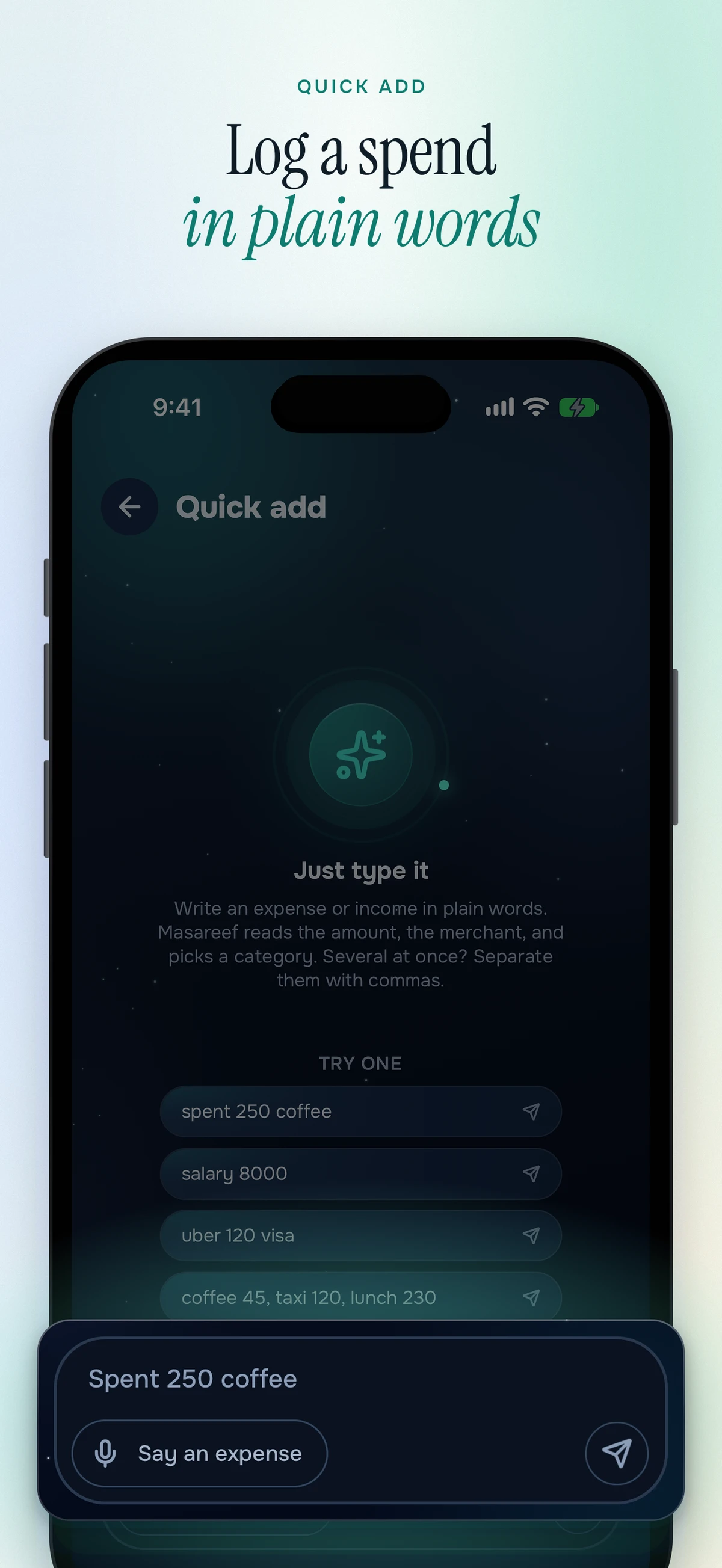
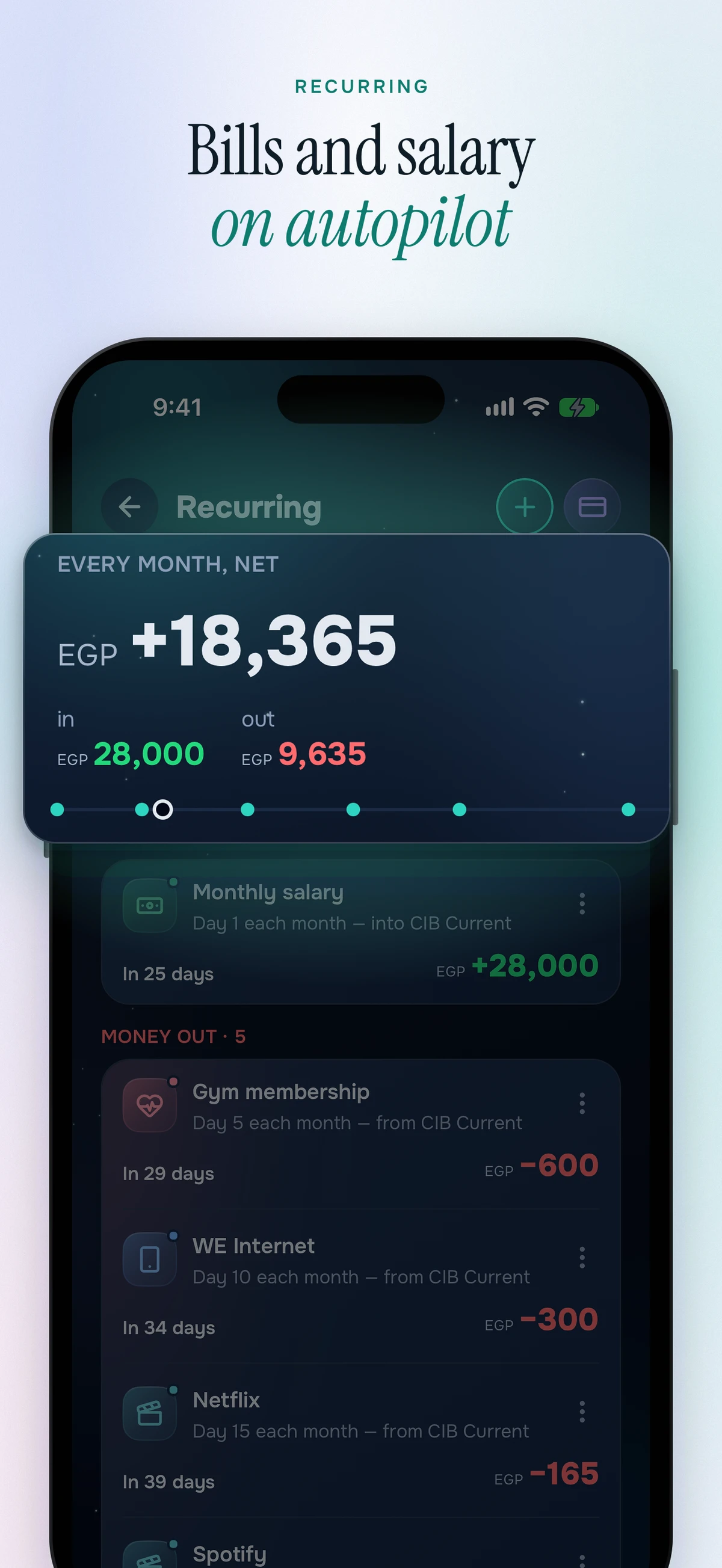
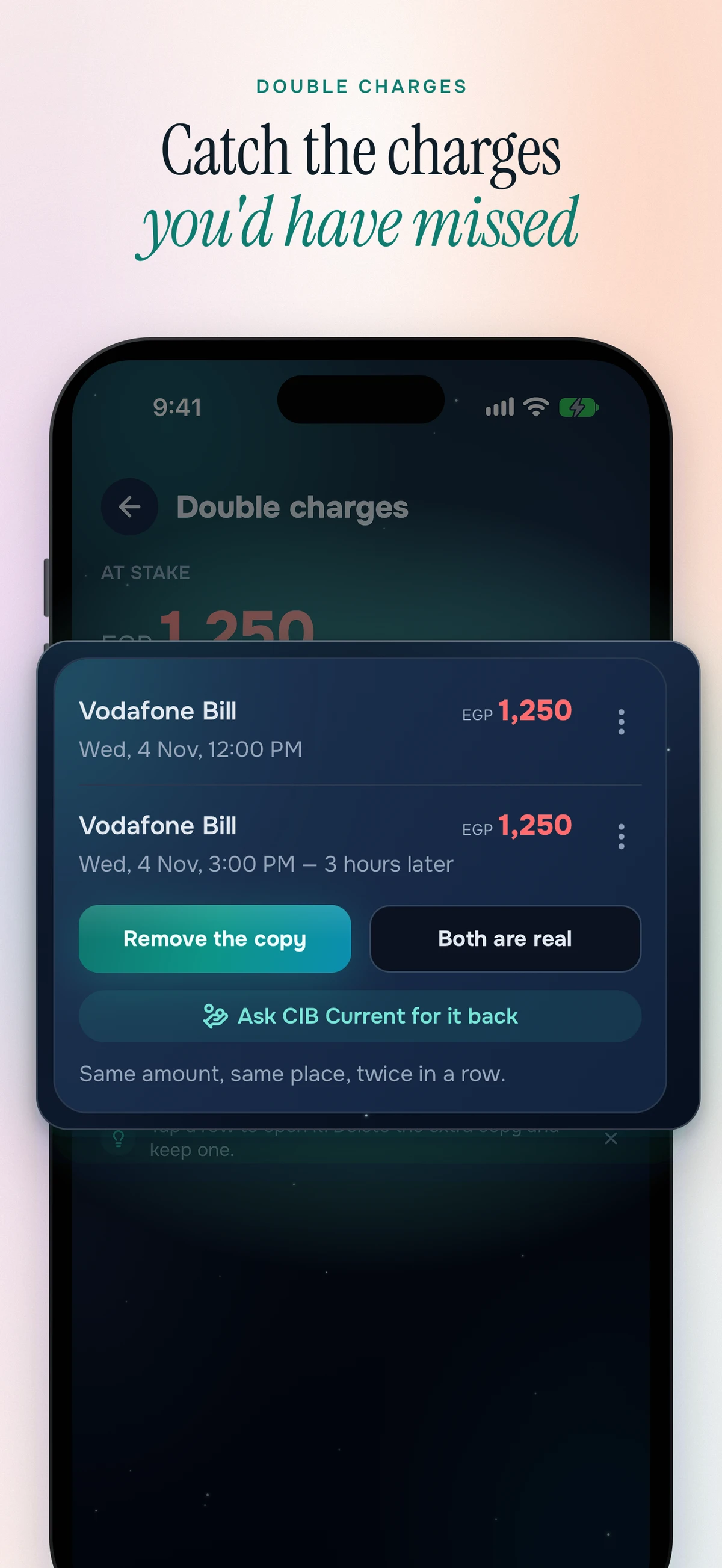
A tour of Masareef 1.147 as it ships on the App Store. Eight screens, each with the one card that matters lifted out.
Why Masareef#
Most finance apps make you fight for every entry, then ask you to trust the cloud with your raw transactions. Masareef does the opposite on both counts: logging is a couple of taps, your bank's own notifications do the data entry, and everything lives on your device first.
- Offline-first, instant. A local SQLite database is the single source of truth, so every read and write is immediate and works with no signal. Cloud sync is a best-effort background reconciler, never a blocker.
- Auto-capture, not auto-trust. Masareef parses a bank notification or SMS into amount, merchant, bank, card tail and reference, and lands it in a review queue. High-confidence captures can post on their own with one-tap undo; nothing else touches a balance until you confirm.
- Privacy by design. An optional app lock, hidden contents in the app switcher, a one-tap Hide balances mask, and analytics that never carry amounts, merchants, or balances, only structural events.
- Light and dark, English and Arabic. A "Slate Teal" identity in both themes, and a full right-to-left layout where every screen mirrors.
Features#
Automatic spending capture
- A notification-listener bridge (Play-safe) reads payment alerts from 1203 banks and wallets in 111 countries; an SMS parser handles sideloaded builds, the paste box and past messages imported from a backup file
- Card payments, transfers, top-ups, ATM withdrawals and incoming money, each routed to the right wallet by name
- Keeps capturing while the app is closed: a headless task can parse, accept and notify with nothing on screen
- Recovers alerts Android redacts or hides, in every language, and says why a message went to review instead of posting
- A bank-only allowlist gate plus word-bounded Arabic-aware matching, so an OTP, a promo, or a customer named مبروك never becomes (or deletes) a transaction
- Reference-based dedupe: one bank SMS relayed by three apps is one transaction, not three
- Learns merchant → category rules as you confirm, shows what it learned and lets you unlearn it; ready cards add as a group, and the review queue only asks what nobody has answered
- A flagged row settles from its swipe: Looks right, or pick a category; Trusted senders and Refused messages list what you trusted, marked spam or ignored, each one undoable
- An alert it cannot read can be mailed to the developer with account numbers masked; a daily capture rollup and an in-app How auto-track works guide with a live setup check say whether capture is healthy
Banks and wallets it reads
1203 institutions across nine groups, matched by their own notification wording in Arabic and English. Masareef is an independent app: it is not affiliated with or endorsed by any institution named here, and it never asks for a banking password.
A page for every bank, in Arabic and English. The most-used: مصرف الراجحي · البنك الأهلي السعودي · بنك الرياض · مصرف الإنماء · البنك السعودي الأول (ساب) · بنك البلاد · STC Bank (STC Pay) · urpay · البنك الأهلي المصري · بنك مصر · البنك التجاري الدولي (CIB) · InstaPay (انستاباي) · فودافون كاش · بنك الإمارات دبي الوطني · بنك ويو (Wio) · الإمارات الإسلامي. Does Masareef work with your bank? See all 1203.
By country: Egypt · Saudi Arabia · UAE · Kuwait · Qatar · Bahrain · Oman · Jordan · Lebanon · Iraq · Palestine · Morocco · all 111 countries.
If a bank is missing, send the wording of one of its alerts and it gets added.
Add in seconds
- Add reads as one sentence, "Spent 250 on Food from CIB", and each word is the control: tap it to change the amount, category or wallet. Each wallet shows its balance and what it will read after this entry, and transaction details read as the same sentence
- Expense, income or transfer, with notes and any date; the + button opens on what the screen you came from needs (Transfer from Wallets)
- Or just type it: "spent 250 coffee", in English or Arabic, posts instantly; one line can log a whole day ("coffee 45, taxi 120, lunch 230" becomes three transactions, each with its own Undo), and you can say it too
- The amount field is a calculator: type a sum and the saved figure is the result. Swipe a row to delete it, with Undo
- A fee belongs to its transaction, taken out of the amount or added on top, with InstaPay's published tariff as the default
- Reply straight from the notification to log without opening the app; paste or share a bank message in; attach a receipt photo
- Money is stored as integer minor units end to end, never floats, and rendered through one formatting path
Wallets & multi-currency
- Banks, cash, cards and mobile wallets, grouped, each with its own balance, colour and history; a wallet can stay out of the total
- Cards take a credit limit, so the bank's "available limit" becomes what the card owes, and what your cards owe counts in your total debt
- Pick any country and currency and the app adapts symbols, formatting and the banks it recognizes
- Net worth across every wallet, with a trend for recent months; gold by the gram, foreign cash and holdings can be added (Pro)
- Savings wallets carry a rate that syncs, and goals say what the interest adds; deleting a wallet can name an heir for its history
- Count your cash reconciles the notes in your pocket; balance check compares your bank's own figure and shows the drift
Budgets & planning
- Per-category monthly limits with on-track, near-limit and over states, and optional alerts before one tips over
- A monthly spending target that answers what is safe to spend today
- Cash flow that answers whether the balance lasts to payday, not just to month end
- A coming up list of everything scheduled in the next 30 days
- An income plan split by percent into four shares (essentials, spending, fun, savings), each with its own limit and alerts; it syncs to your account
- Your plan shows whether goals and debts fit what is left each month, and Money structure sets up income, reserve, savings and investing step by step for you to approve (both Pro); Your money profile (risk, reserve, household) sharpens the advice, and Grow your income is a weekly checklist of ways to earn more for your job and skills, with an AI version in Pro
- The month can start on payday, and Slap mode sets a daily or weekly ceiling that tells you when you cross it
- Today's safe-to-spend can stay in view: a pinned Android notification, and an iOS Lock Screen widget that rolls to tomorrow's figure at midnight
Subscriptions, bills & debts
- Subscriptions detected from your own history, with brand logos and yearly cost; overdue and price-raised ones flagged
- Recurring rent, salary and bills that post on schedule, with catch-up, pause and skip
- Planned one-off income or expense held pending until you confirm it
- Debts you owe or are owed, and savings goals
- Split a bill by percent, amount or shares, lock one person's part and the rest rebalances (equal split is free); Kitties keep a shared pot several people pay into, with each member's usual share and money back that lowers what the group spent (Pro)
- Installment plans followed to the last payment and reschedulable over what is still owed, and a gam'eya (rotating savings circle) tracked with your monthly share and the pot on your turn
- Zakat computed from the wealth you already track, against nisab, with gold counted from Net worth
Insights
- Home's month card has four pages (Now, Ahead, In & out, Shape), and the month word on Home and Insights opens the whole year as a grid
- Insights is a wall of small charts, each with its finding; tap one for the full chart
- Where it went: a donut ranking every category, tappable straight through to its transactions
- Income vs. expense over six months, this month vs. last, and your biggest movers
- Spending calendar heatmap, day-of-week and time-of-day patterns
- Savings rate, financial health, and the share of spending that logged itself
- Price creep on your regular buys, no-spend streaks, top merchants, and a shareable money-story recap
- Subcategories (two levels) with a two-ring chart and a drill-down sheet, and a page for every category
- Home shows what you choose, or a simple mode; notifications split into alerts, summaries and reminders, filtered by kind with counts
- Search finds settings, tools, screens and payments, including by the amount you remember; Tools and Settings each have their own search
- Ask answers questions about your own ledger, in the language you typed, from the app's own figures; an evening recap at 9:30 PM says what today cost
Widgets
- Home-screen widgets for today's spending, your daily ceiling, your budget, a wallet balance, a goal and what charges this week, plus quick buttons that log your usual spends
- The spending and ceiling widgets are free; most of the rest are Pro
- Android has eleven home-screen widgets and a Quick Settings tile that adds a spend without opening the app; iPhone adds a Lock Screen widget with today's safe-to-spend
Compare prices
- Scan a barcode or search a product to see prices near you and from shops that deliver, each with where it came from and when; old prices are marked, never shown as current
- Prices come from shops, their feeds and store pages, Open Prices, and shoppers who add what they paid; shops sign up in the app (Sell on Masareef), upload a price list from Excel or CSV and go live after review
- A shopping list: tick each item as it goes in the basket, then save what you paid as one expense
- Stores near you lists supermarkets, pharmacies and more with their address and contact
- Free for everyone
Privacy
- Transactions stay on the device and sync only to your own account; an optional app lock, hidden contents in the app switcher, and a one-tap Hide balances mask
- Location is used only when you ask: nearby ATMs, prices near you, or detecting a trip's country; prices get a point rounded to about a kilometre
- Analytics never carry amounts, merchants or balances. The Pro AI features run only when you tap them, send only what that one job needs to Cloudflare Workers AI, and never send the ledger
Languages
- 39 languages: hand-written English and Arabic (every screen mirrors right to left, switchable in-app, with an Egyptian Arabic option), and 37 more machine-translated from English, including French, Spanish, Portuguese, German, Turkish, Persian, Urdu, Hindi, Bengali, Indonesian, Japanese and Korean
- Light and dark themes you pick in Settings
Catch mistakes
- Double charges: the same amount hitting the same merchant twice
- Refunds matched back to the purchase they reversed
- Charges above what a merchant normally costs you (Pro)
- Returns and warranty: what you can still take back or claim on, with a reminder before the window closes (Pro)
Trips & ATMs
- Track a trip in its own currency and exchange rate, without polluting your normal months (Pro)
- Find cash machines around you on a map or list, sorted by distance, filtered by bank or exchange; the data comes from our own proxy over TomTom, Foursquare, Geoapify and OpenStreetMap, drawn on keyless OpenFreeMap tiles
Backup & sync
- Sign in and your wallets, transactions, budgets, categories and trips follow you to a new phone
- Coming from another money app: import its CSV or Excel export, pick which column is which, map its type words and categories onto yours, and see every skipped row with its reason
- Fully offline-first: edits happen locally and instantly, then reconcile in the background (last-write-wins by timestamp)
- Two clocks kept separate: a client clock decides who wins and a server cursor decides what's new, so sync is immune to device clock skew; deletes propagate as tombstones and the network layer never throws
- Where your data lives shows whether the ledger sits on Masareef sync, your own Google Drive or iCloud, or only this phone (Pro to change); Saved files keeps the statements, exports and backups you saved
- A full JSON backup/restore (file pick, paste, or share intent) is free; CSV export, a password on the backup file and a daily copy to your own Google Drive are Pro
- A free account syncs one phone; Pro syncs all of them and lets a household share one ledger
How it's built#
Offline-first by design: the local SQLite database is the single source of truth for the UI, so every read and write is instant and works with no signal. Derived answers (totals, pace, runway, habits) come from a dedicated ledger layer that returns answers rather than rows, so no screen recomputes the same aggregate twice.
Cloud sync runs as a best-effort background reconciler (a socket first, with the POST path as fallback) against a Cloudflare Workers API (Hono + Drizzle on D1, with each ledger on one of fourteen shards: seven D1 databases and seven SQLite-backed Durable Objects, and the sync socket held by a Durable Object): local changes are flagged and pushed, remote changes pulled page by page, and conflicts resolve last-write-wins by timestamp. Session lives in SecureStore via better-auth + @better-auth/expo, and key derivation runs on the device.
Auto-track is the part that can silently lose money, so it is the most defended piece of the app: a durable native spool that survives the process being killed, a bank-only allowlist, word-bounded matching for the Arabic drop markers, reference-based dedupe, and a trace log that records why any message was dropped or held.
Tech stack#
| Layer | Choice |
|---|---|
| Framework | Expo SDK 58 + Expo Router (typed routes, declarative auth guards) |
| Runtime | React Native 0.88 / React 19.3, React Compiler enabled |
| Language | TypeScript, strict mode |
| UI | NativeWind 4 (Tailwind) + a dual light/dark palette (usePalette()) |
| Client state | Zustand, persisted to MMKV |
| Local data | expo-sqlite, the offline-first source of truth |
| Cloud sync | custom last-write-wins engine over a typed pull/push contract |
| Backend | Cloudflare Workers + Hono + Drizzle · D1 + SQLite Durable Objects (ledger shards, sync socket) |
| Server state | TanStack Query |
| Auth | better-auth + @better-auth/expo (session in SecureStore, Google Sign-In, Apple on iPhone) |
| Billing | RevenueCat (react-native-purchases), Google Play and App Store |
| Auto-track | notification-listener bridge (Play-safe) + SMS parser + native spool; iOS via a Shortcuts App Intent |
| Maps | MapLibre on keyless OpenFreeMap tiles; ATMs from our own proxy (TomTom, Foursquare, Geoapify, OpenStreetMap) |
| Animation | react-native-reanimated · SVG via react-native-svg |
| Icons | lucide-react-native |
| i18n | i18next / react-i18next: hand-written English and Arabic (RTL), 37 more languages machine-translated from English |
| Analytics | PostHog (privacy-safe: no amounts, merchants, or balances) |
Non-negotiables#
- Offline-first. The local SQLite DB is the source of truth; the app is fully usable with no connection and sync is never a blocker.
- Money is integer minor units. Never floats, end to end, and one formatting path renders every amount.
- Auto-capture never silently loses a transaction. A dropped capture is the one outcome a user can't recover, so every drop rule is word-bounded, traced, and covered by a "never miss a real transaction" test.
- Analytics carry no financial data. Structural events only, never amounts, merchants, or balances.
Deep dive: reading bank messages automatically, on Android and on iOS#
Most expense trackers ask you to type. Masareef's auto-track reads the alert your bank already sent you and books it. The whole design, what each platform permits, the rules that survived real banks and the failures that paid for them, is written up in Reading bank notifications to log expenses automatically, on Android and iOS.
Refunds#
Bought through a store, refunded by that store. Google Play takes self-service refund requests for about 48 hours after the purchase and decides the rest case by case: how to ask Google. Apple sets no fixed window and reviews every request: report a problem. If a store turns you down and you think it was wrong, write to us and we will put the request to them ourselves.
Bought directly from us rather than through a store: write within 14 days of the payment and you get all of it back, no reason needed. The money goes back to the card or wallet that paid it. Banks take up to 14 working days to show it, which is their clock rather than ours. A refunded lifetime unlock is switched off on the account it was bought for.
Cancelling a subscription is not a refund. It stops the next charge, and Pro keeps running until the end of the period you already paid for.
Support#
One address for all of it (a bug, a bank whose alerts are not being read, a refund, a question about your data): booogado@gmail.com.
Masareef is built and sold by Mohamed Hamed Mohamed Gado, Egypt.
Terms#
Pro is a right to use the app, granted to your Masareef account. You are not buying the app itself, and the right cannot be resold or moved to someone else's account.
What you keep if you stop paying: everything. Every transaction, wallet, budget, goal and debt stays exactly where it is and the app keeps working. Automatic capture returns to its free monthly allowance and the Pro screens lock. Nothing is deleted and nothing is held hostage.
A lifetime unlock is not a subscription and never renews. If prices change later, one already bought is unaffected. A subscription renews at the price you agreed until you cancel it; if that price ever changes, the store tells you before it charges you and you can cancel first.
Masareef records money you have already spent. It is not financial advice, and automatic capture is a best-effort reading of the messages your bank sends. It can miss one, and your bank statement is the authority, not this app. Check anything that matters against it.
Your account and its data are yours to delete at any time, from inside the app or by asking us: delete your account. What we collect and why is in the Privacy Policy.
These terms are governed by the laws of the Arab Republic of Egypt.